How To Navigate This Site
This course is hosted on MDFT Pro, an educational service platform optimized for online training courses. The MDFT Pro user interface looks like this:
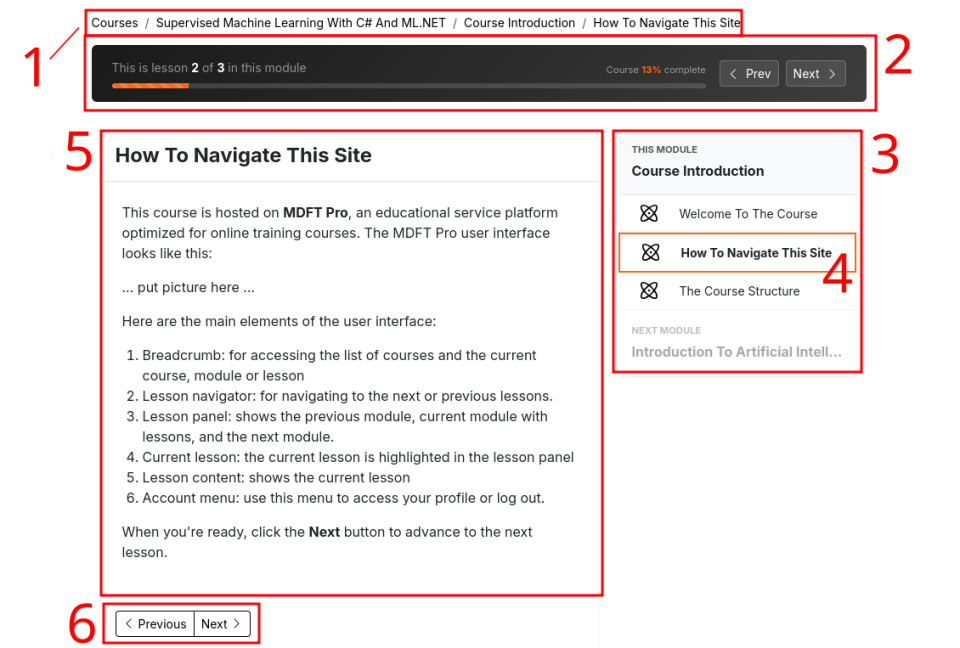
Here are the main elements of the user interface:
- Breadcrumb: for accessing the list of courses and the current course, module or lesson.
- Lesson navigator: for navigating to the next or previous lessons.
- Lesson panel: shows the previous module, current module with lessons, and the next module.
- Current lesson: the current lesson is highlighted in the lesson panel.
- Lesson content: shows the video or text content of the current lesson.
- Navigation buttons: for browsing to the previous or next lesson.
As you can see, there are many ways to navigate the lessons and modules in this course. You can use the lesson navigator at the top of the page, the lesson panel on the right, or the navigation buttons at the bottom of the page below the lesson content.
When you're ready, click the Next button to advance to the next lesson.